
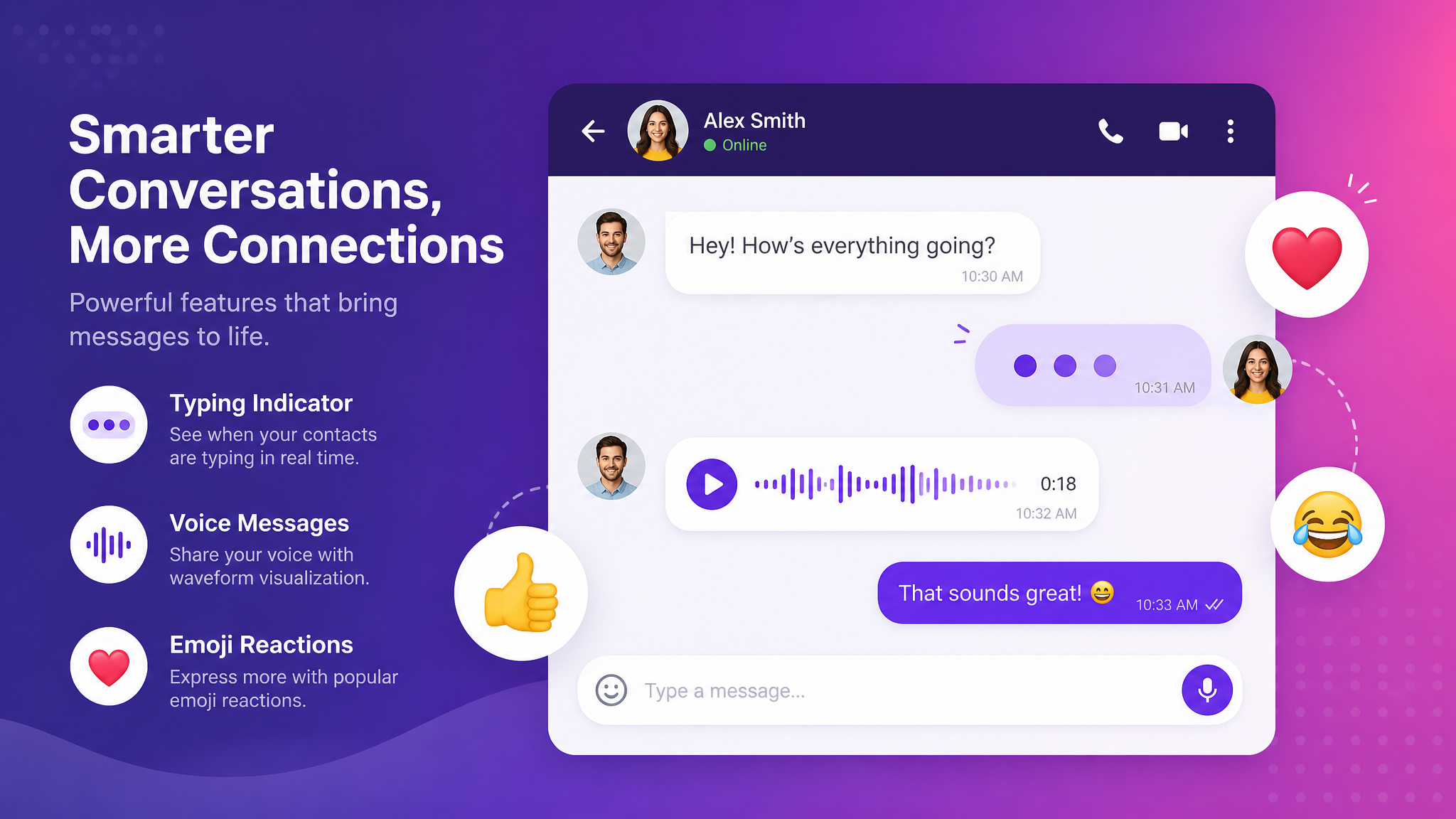
Messaging Features 2026: Typing Indicators, Voice Messages & Emojis
The everyday messaging features that matter in 2026 - typing indicators, voice messages, popular emojis, timed messages and true cross-platform messaging.
The big debates about messaging apps — encryption, ownership, privacy — get all the headlines. But the reason you actually enjoy using an app day to day comes down to the small stuff: the little animation that tells you someone is replying, the voice note you can fire off while walking, the exact emoji that lands a joke. In 2026 these details are not garnish; they are the experience.
This guide looks at the everyday features that define a great modern messenger — typing indicators, voice messages, popular emojis of 2026, timed messages and true cross-platform messaging — what they do, why they matter, and how a privacy-first app can deliver all of them without harvesting you in the process.
Typing Indicators: The Smallest Feature That Changes Everything
Typing indicators — those three little animated dots that appear when the other person is composing a reply — are one of the most quietly important features in messaging. They solve a very human problem: the anxiety of the silence after you send something. Seeing that the other person is typing turns a nerve-wracking void into an ordinary pause in a conversation.
They also make chat feel live. A conversation with typing indicators feels like two people in the same room; one without them feels like posting letters. The feature works by sending a small, temporary signal to the other participant while your keyboard is active — it carries no content, just the fact that a reply is on its way.
The privacy angle
Because a typing indicator reveals that you are present and active, a thoughtful app treats it as a courtesy signal between people in a conversation, not as data to be logged and analysed. The signal should serve the two people talking, and then disappear — which is exactly how it should be implemented.
Voice Messages: Talking Without Calling
Voice messages — sometimes searched for as voicemess or simply "voice notes" — have become one of the defining ways people communicate, especially across generations and languages. They occupy a perfect middle ground between a text (fast but flat) and a phone call (rich but demanding). You can record a voice note whenever it suits you, and the recipient can listen whenever it suits them.
They carry tone, warmth, humour and nuance that text strips out. For people who find typing slow, for complex explanations that would take paragraphs, and for the simple pleasure of hearing a friend's voice, voice messages are irreplaceable.
What makes voice messages good
The details matter: quick press-to-record, the ability to listen back before sending, playback speed control for long notes, and a clear waveform so you can see the length at a glance. On an encrypted app, a voice message gets the same end-to-end protection as text — your voice is not sitting readable on a server.
Popular Emojis of 2026: A Language of Their Own
Emoji stopped being decoration a long time ago; they are now a genuine layer of language, carrying tone and irony that plain text cannot. The popular emojis of 2026 reflect how conversation has evolved — more ironic, more reaction-based, more visual.
| Emoji trend in 2026 | What it signals |
|---|---|
| Face-based reactions (😭, 💀, 😮💨) | Exaggerated emotional shorthand, often ironic |
| Understated approval (🫡, ✨, 👍) | Low-key acknowledgement and support |
| Reaction emojis on individual messages | Replying without cluttering the thread |
| Custom and animated stickers | Personal, community-specific expression |
The bigger shift is reactions: tapping an emoji onto a specific message rather than sending it as a new one. It lets you acknowledge, agree or laugh without adding noise to a busy group chat — a small feature that dramatically improves how large conversations feel.
Timed Messages: Everyday Ephemerality
Timed messages — messages that delete themselves after a set period — have moved from a security feature to an everyday convenience. They keep conversations tidy, stop group chats becoming endless archives, and let you share something in the moment without it living forever. Paired with encryption, an expired message is genuinely gone rather than merely hidden.
Cross-Platform Messaging: The Feature You Only Notice When It Is Missing
True cross-platform messaging means your conversations follow you seamlessly across your phone, your computer and the web, staying perfectly in sync. Start a message on your phone on the train, finish it on your laptop at your desk, glance at it on a browser on a borrowed machine — same conversation, same history, no friction.
It sounds basic, but plenty of apps still tie you awkwardly to a single primary device. In 2026, being genuinely cross-platform — with the same encrypted conversations available everywhere — is a baseline expectation, not a luxury. It is also essential for anyone using a chat app for work, where the phone is for the field and the desktop is for real typing.
How PigeonChat Brings the Details Together
PigeonChat is built so that the everyday experience is as good as the privacy story. Typing indicators make conversations feel live. Voice messages let you talk without calling, encrypted end-to-end like everything else. A rich set of emoji, reactions and stickers covers the full expressive range people expect in 2026. Timed messages keep chats tidy and ephemeral where you want them to be. And true cross-platform messaging means all of it works consistently across phone, desktop and web.
The philosophy is simple: a private app should not feel like a compromise. The moment a privacy-first messenger feels worse than the mainstream one, people stop using it — so the everyday details have to be excellent, not merely adequate.
Stickers, Reactions and Reels: Expression Beyond Text
If emoji are the vocabulary of modern chat, stickers and reels are the full sentences. Custom and animated stickers let communities develop their own visual in-jokes — an image that means something specific to your group and nothing to anyone else. They are a huge part of why chatting feels playful rather than purely functional, and they carry personality in a way plain text simply cannot.
Short-form reels bring the same expressive energy to the social side of an app. A quick video is often the fastest, warmest way to show something — a place, a moment, a reaction — and in 2026 it is as normal a unit of communication as a paragraph once was. The best apps let these expressive layers flow naturally between private chat and the social feed rather than walling them off.
Read Receipts, Presence and Being in Control
Alongside typing indicators sit two related signals: read receipts (whether your message has been seen) and presence (whether someone is online). Both make conversation feel connected — you know your message landed, you know when someone is around — but both are also personal, and a well-designed app gives you control over them.
The right approach is symmetry and choice: you can usually decide whether to share read receipts and presence, and that choice applies both ways. Some people love the immediacy of knowing exactly when a message is read; others find it stressful. A respectful app lets each person set their own comfort level rather than forcing everyone into constant visibility. Like typing indicators, these are courtesy signals for the people in the conversation — not data to be mined.
The Small Details Add Up to a Feeling
Individually, none of these features is revolutionary. Together, they are the entire difference between an app that feels alive and one that feels like a chore. A typing indicator here, a voice note there, the perfect reaction emoji, a sticker that makes a friend laugh, a reel that shows rather than tells — this texture is what keeps people coming back. A privacy-first app that nails these details proves the most important point of all: you do not have to give up delight to get privacy.
Frequently Asked Questions
Can I turn typing indicators off?
On most well-designed apps, yes — typing indicators are a courtesy signal, and you can usually control whether you broadcast them. They are meant to serve the people in the conversation, not to track anyone.
Are voice messages encrypted?
On an end-to-end encrypted app like PigeonChat, voice messages get the same protection as text: they are encrypted on your device and only decrypted on the recipient's, so your voice is not readable on a server.
What are the most popular emojis in 2026?
Reaction-style and exaggerated emotional emoji dominate, along with understated approval symbols and a rise in custom, community-specific stickers. The biggest change is reacting to individual messages with an emoji rather than sending a separate reply.
Why does cross-platform messaging matter so much?
Because your life is not on one device. Being able to continue the exact same encrypted conversation on your phone, laptop and browser without losing history is what makes an app usable for both personal and work life.
The Bottom Line
Encryption may be why you choose a messenger, but typing indicators, voice messages, the right emoji, timed messages and seamless cross-platform messaging are why you enjoy using it every day. The best apps of 2026 refuse to treat privacy and delight as a trade-off — they deliver both.
Try the full experience: download PigeonChat or browse the feature list. To understand the encryption underneath these everyday features, read how encrypted messaging works.

Writer & Editor at PigeonChat
Related Articles
Instagram-Style Posts & Stories on PigeonChat: Share Moments

What a European chat app should offer now

Why browsers are becoming the new private chat home

PigeonChat.site in the UAE chat app search
